Home Framework Hero Products Social Proof Navigation Conversions Blog About Contact
Getting Started

Start Building a Homepage That Converts

Your step-by-step guide to implementing HomepageFrame — from creating your free account to measuring your first conversion lift. Most stores see measurable results within 14 days.

Your Roadmap

What You'll Accomplish in 3 Weeks

HomepageFrame is designed for busy store owners. Here's a realistic week-by-week plan that delivers results without overwhelming your schedule.

Week 1
🏗️

Hero Section & Navigation Audit

The highest-leverage changes you can make. Fixing your above-the-fold messaging and navigation clarity typically reduces bounce rate by 15–25%.

  • Run the 47-point homepage audit
  • Rewrite hero headline using the AIDA framework
  • Optimise hero CTA button copy and placement
  • Audit and simplify navigation structure
  • Set up baseline analytics measurement
Week 2

Product Showcase & Trust Signals

Improve how your products are presented and add social proof that converts visitors who are on the fence. Add-to-cart rates typically improve 20–35%.

  • Implement featured product section layout
  • Add review count and star rating display
  • Set up trust badges and security signals
  • Add press mentions or media logos
  • Set up customer testimonial carousel
Week 3
🎯

Conversion Sections & Optimisation

Fine-tune your CTAs, add scarcity and urgency signals, and set up your email capture flow. Measure, iterate, and start A/B testing your top improvements.

  • Optimise all CTA placements and copy
  • Add urgency and scarcity signals where appropriate
  • Implement email capture pop-up strategy
  • Set up first A/B test (hero headline)
  • Review week 1 analytics and iterate
Step by Step

Your Getting Started Guide

Four clear steps from zero to a measurably better homepage. Each step links to everything you need.

1

Create Your Free Account

Get instant access to the Starter plan — no credit card required. You'll receive your audit checklist and first three framework modules by email immediately after signing up.

2

Run the Homepage Audit

Before making any changes, establish your baseline. The 47-point audit checklist systematically scores every element of your current homepage, helping you prioritise the highest-impact improvements first. Most stores complete the audit in 45–60 minutes.

Download the Audit Checklist
3

Choose Your First Module

Based on your audit results, select the framework module that addresses your biggest gap. For most stores, that's the Hero Section — but your audit score will point you in the right direction. Each module comes with a full implementation guide, templates, and before/after examples.

Browse All 12 Modules
4

Implement, Measure & Iterate

Follow the module guide to implement your changes, then give it at least two weeks of consistent traffic before measuring. Use the KPI dashboard template provided with each module to track bounce rate, scroll depth, CTA click-through, and conversion changes. Real data from your store drives every next decision.

Read Case Studies
Your Journey

Your Learning Path with HomepageFrame

A progressive path from your first audit to running a continuously optimised, high-converting homepage.

1

Foundation: Audit & Account Setup

Run the homepage audit, create your account, understand your current baseline metrics, and set your primary conversion goal.

2

Quick Wins: Hero & Navigation

Tackle the two highest-leverage sections first. Improve your headline, hero CTA, and navigation clarity for immediate impact on bounce rate.

3

Trust Building: Social Proof & Products

Layer in trust signals — reviews, press, certifications — and optimise how your featured products are displayed and merchandised.

4

Conversion Optimisation: CTAs & Email

Fine-tune every CTA, implement your email capture strategy, and add behavioural triggers like urgency and social validation.

5

Advanced: A/B Testing & Full Rollout

Begin systematic A/B testing, complete all remaining modules, and establish a continuous optimisation rhythm for sustained growth.
HomepageFrame learning path
Start Today

3 Quick Wins You Can Do Right Now

Don't wait until you've read everything. These three actions take less than an hour each and deliver immediate, measurable results.

Under 1 Hour
✏️

Fix Your Hero Headline

Most eCommerce hero headlines describe the store rather than speaking to the customer's desire. A two-sentence rewrite using our AIDA formula can lift scroll depth by 20% or more — and it takes 30 minutes to do.

Hero Section Guide →
Under 45 Minutes
🏆

Add Trust Badges Above the Fold

Adding visible trust signals — free returns, secure checkout, review count — near your hero CTA directly reduces purchase hesitation. Pull three of your strongest trust points and place them below your headline today.

Social Proof Module →
Under 30 Minutes
🎯

Optimise Your Primary CTA

Is your primary homepage CTA "Shop Now"? That's leaving conversion rate on the table. Changing to a benefit-driven CTA like "Find Your Perfect Fit" or "Get 20% Off Today" consistently outperforms generic button copy in A/B tests.

Conversion Sections →
The Bigger Picture

Understanding the Customer Journey

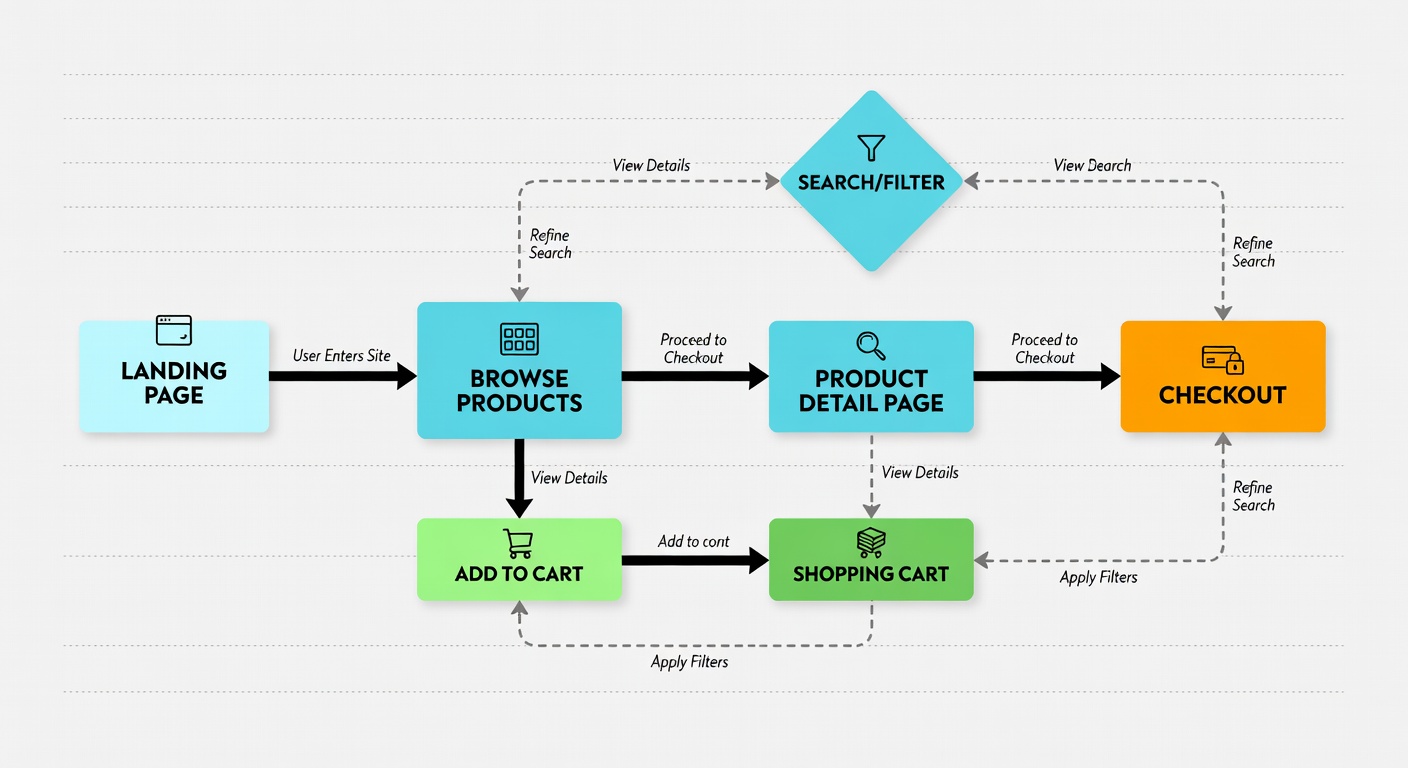
A high-converting homepage isn't about tricks — it's about guiding visitors through a logical, trust-building journey from first impression to confident purchase decision. HomepageFrame maps every section to a specific stage of that journey.

1
Awareness & First Impression (0–3 sec)

Hero section communicates value proposition and establishes brand credibility before the visitor scrolls.

2
Interest & Exploration (3–30 sec)

Navigation and featured categories help the visitor find relevance quickly and continue scrolling.

3
Desire & Trust Building (30 sec–2 min)

Product showcases, social proof, and trust signals build confidence and create product desire.

4
Action & Conversion (2 min+)

Clear CTAs, urgency signals, and low-friction paths turn interest into clicks and purchases.

Explore the Full Framework
eCommerce customer journey diagram
Platform Guides

Setup Guide for Your Platform

HomepageFrame works with all major eCommerce platforms. Choose yours for platform-specific implementation instructions.

🛍️

Shopify & Shopify Plus

Online Store 2.0 / Legacy themes supported
  • 1
    Install the HomepageFrame companion app from the Shopify App Store
  • 2
    Open your theme editor and enable section groups on your homepage template
  • 3
    Import the HomepageFrame section presets using the JSON import tool
  • 4
    Customise each section's content using our copywriting templates
  • 5
    Preview, test on mobile, and publish your first module
Get Shopify Setup Guide →
🔌

WooCommerce

WordPress / Classic & Block Editor supported
  • 1
    Download the HomepageFrame WordPress plugin from your account dashboard
  • 2
    Activate the plugin and run the setup wizard to import page templates
  • 3
    Use the block patterns library to add HomepageFrame sections to your homepage
  • 4
    Connect your WooCommerce product data to the featured sections
  • 5
    Publish and verify on mobile using the browser device simulator
Get WooCommerce Setup Guide →
🏬

Magento / Adobe Commerce

Magento 2.x / Adobe Commerce supported
  • 1
    Download the HomepageFrame Magento extension from your account
  • 2
    Install via Composer and run setup:upgrade to register the module
  • 3
    Configure CMS blocks for each HomepageFrame section in the admin panel
  • 4
    Add the HomepageFrame widget to your homepage CMS page layout
  • 5
    Flush cache, test on staging, then deploy to production
Get Magento Setup Guide →
🏪

BigCommerce

Stencil framework / Headless supported
  • 1
    Access the HomepageFrame BigCommerce templates from your dashboard
  • 2
    Use Page Builder to import the HomepageFrame widget library
  • 3
    Drag HomepageFrame sections onto your homepage canvas in Page Builder
  • 4
    Connect each section to your product catalog and content feeds
  • 5
    Preview across breakpoints using BigCommerce's preview tool and publish
Get BigCommerce Setup Guide →
Community

You're Not Doing This Alone

Join a community of 8,400+ eCommerce founders and marketers who are using HomepageFrame to build better stores. Share your progress, get feedback on your implementation, and learn from people who've already done it.

8,400+
Active Members
500+
Stores Improved
Daily
Team Support

Join and get weekly implementation tips:

Unsubscribe any time. No spam — ever.
The Time is Now

Your High-Converting Homepage Starts Today

Every week without an optimised homepage is revenue you're leaving on the table. Start for free — your audit checklist is waiting.